
SuiteMed IMS

1. To make sure all prescriptions sent electronically were delivered succesfully to the pharmacy, you need to check the prescritpion tracking screen for the status.
By doing so, go to Activit..
1. There are options in IMS that we select a value from a dropdown menu. If the value is not in the list, we can add it if it's available in the Misc Values list.
By doing so, go to Setup >..
HOW TO ADD A DRUG MANUALLY TO IMS (IF THE DRUG IS NOT FOUND IN THE DRUG DB LIST)
1. Go to Setup >> Prescription.
2. The prescription options will populate. Double click on Drug op..
In the case where RDMS (Remote Desktop Management Service) is not starting, the fix is to restart the "Windows Internal Database" service and THEN start RDMS again
1. Restart Windows I..
1. The second MIPS category that we need to work on is Improvement Activities category. To start, go to Setup >> MIPS.
2. Double click on MIPS Measures.
3. Select the latest templa..
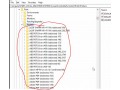
When remote printing has many issues with remote users it's good to remove the printers from registry. To do this:
1. Open registry editor by hitting windows + r on the keyboard&nbs..
Ho to manually update IMS
Go the IMS server and choose all the file that is outside the folder from A to Z
Select them all and copy it and paste it in the local dri..

1. Download the videods.ds file from this blog.
2. Copy the VideoDS.DS file to your C:\windows\TWAIN_32 folder.
3. Restart PC.
4. On IMS or Medisoft Cloud make s..
1. Go to Utilities >> Patient >> Patient Merge
2. Select the patient that you want to remove on the left part then select the other patient that you want to keep on the right. Check..
1. Go to Setup then select Office.
2. Double click on Employee/Provider.
3. Search the user you want to deactivate by clicking on the blue binolocar icon on top then unc..